ui-app
Overview
Builds the Vite/React web UI and deploys it to S3, then invalidates the CloudFront cache so devices and browsers receive the updated assets immediately. There is no CloudFormation stack — this workflow operates directly against S3 and CloudFront.
Dependencies
Deploy Dependencies
| Workflow | Reason |
|---|---|
| cloudfront-ui | CloudFront distribution ID and S3 bucket name resolved from stack outputs |
| cognito | Cognito Client ID injected as a Vite environment variable at build time |
Delete Dependencies
None — this workflow has no prerequisites.
Required By
Required By Deploy
| Workflow | Reason |
|---|---|
| run-integration-tests | UI must be deployed before integration tests validate the full stack |
Required By Delete
| Workflow | Reason |
|---|---|
| delete-cloudfront-ui | S3 bucket must be emptied before the CloudFront/S3 stacks can be deleted |
Deploy Workflow
Description
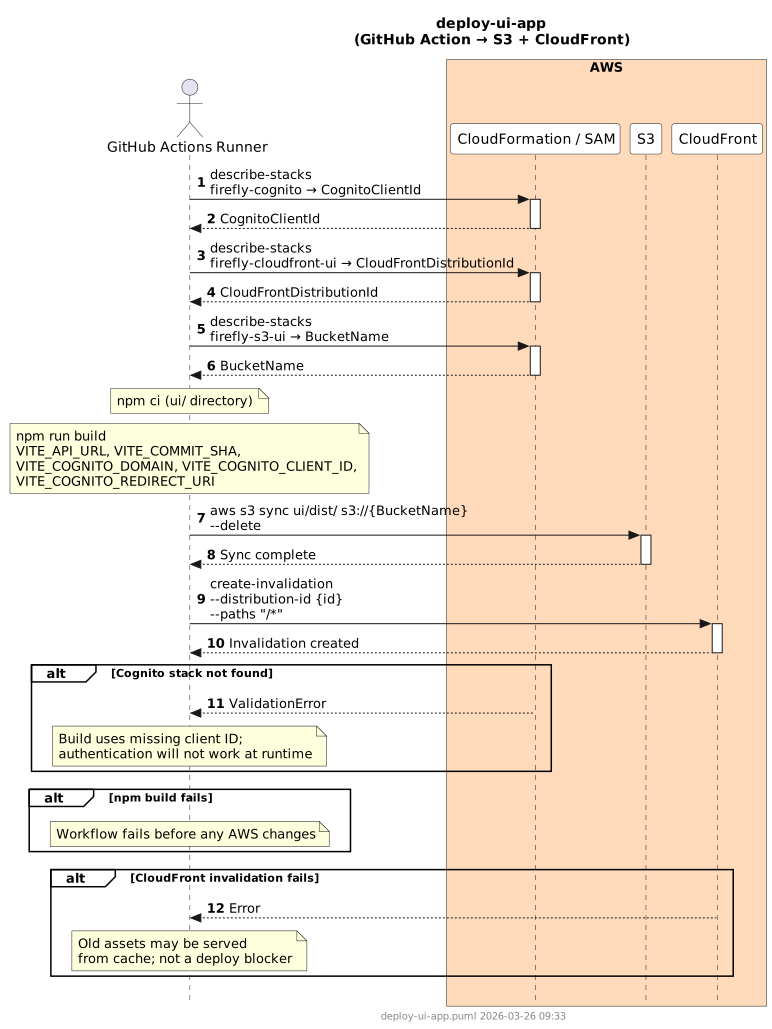
Looks up runtime configuration from three CloudFormation stacks, installs Node.js 20, runs npm ci, and performs a Vite production build with environment variables injected. The compiled assets are synced to S3 with --delete to remove stale files, and a CloudFront wildcard invalidation ensures fresh content is served.
Steps
- Configure AWS credentials.
- Look up
CognitoClientIdfrom thefirefly-cognitostack output. - Look up
CloudFrontDistributionIdfrom thefirefly-cloudfront-uistack output. - Look up
BucketNamefrom thefirefly-s3-uistack output. - Set up Node.js 20.
- Run
npm ciin theui/directory. - Run
npm run buildwith environment variables:VITE_API_URL(from workflow vars)VITE_COMMIT_SHA(fromgithub.sha)VITE_COGNITO_DOMAIN(fromvars.AUTH_DOMAIN_NAME)VITE_COGNITO_CLIENT_ID(from Cognito stack lookup)VITE_COGNITO_REDIRECT_URI(fromvars.UI_DOMAIN_NAME)
aws s3 sync ui/dist/ s3://{BucketName} --deleteaws cloudfront create-invalidation --distribution-id {CloudFrontDistributionId} --paths "/*"
Sequence Diagram
Delete Workflow
Description
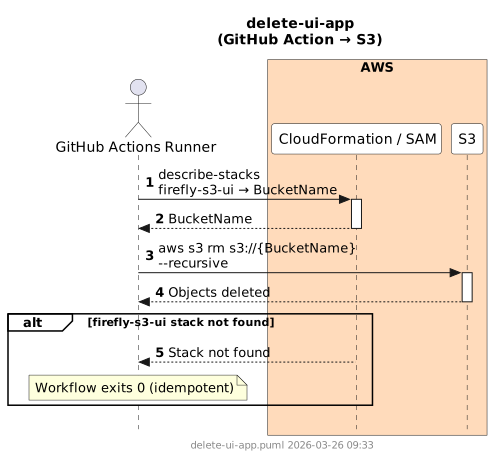
Empties the S3 UI bucket so that the delete-cloudfront-ui and delete-s3-ui workflows can proceed without a non-empty bucket error. Looks up the bucket name from the firefly-s3-ui stack; exits 0 if the stack is not found (idempotent).
Steps
- Configure AWS credentials.
- Look up
BucketNamefrom thefirefly-s3-uistack output. Exit 0 if stack not found. aws s3 rm s3://{BucketName} --recursive
Sequence Diagram
Failure Scenarios
| Scenario | Behavior |
|---|---|
| npm build fails | No AWS changes are made; check Vite config or missing environment variables before re-running. |
| Cognito stack lookup fails | Build proceeds with an empty/incorrect client ID; authentication will not work at runtime. Deploy cognito first. |
| CloudFront distribution ID lookup fails | Workflow fails before S3 sync; deploy cloudfront-ui first. |
| S3 sync partial failure | Some files may not upload; re-run the deploy workflow to retry — --delete ensures stale files are still removed. |
| CloudFront invalidation fails | Old assets may be served from the edge cache for up to the TTL; this is not a deployment blocker. Re-run the invalidation step manually if needed. |