s3-firmware-public
Overview
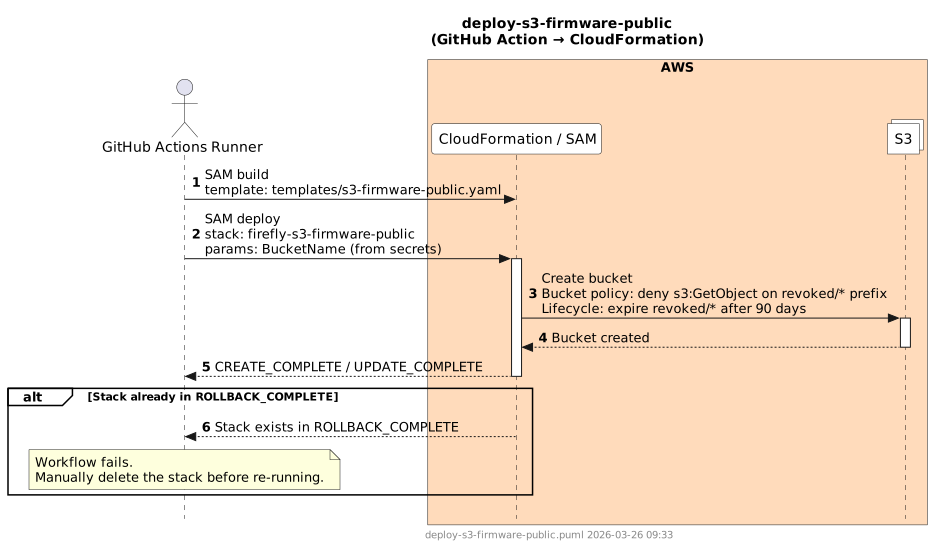
Provisions the public S3 bucket that hosts released firmware binaries. The bucket is fronted by CloudFront for OTA delivery. A bucket policy denies s3:GetObject on the revoked/ prefix (access-denied for revoked firmware), and a lifecycle rule expires objects under revoked/ after 90 days.
CloudFormation Stack
firefly-s3-firmware-public
Dependencies
Deploy
None — this workflow has no prerequisites.
Delete
delete-cloudfront-firmware— the CloudFront distribution must be deleted before the bucket can be removed
Required By
Deploy
cloudfront-firmware— bucket name is passed as a parameter to the CloudFront stack
Delete
delete-acm(transitively, viadelete-cloudfront-firmwaredependency chain)
Deploy Workflow
Description
Builds the SAM template and deploys the firefly-s3-firmware-public CloudFormation stack. The bucket name is passed from secrets rather than generated, so it matches the CloudFront origin configuration.
Steps
- Checkout repository
- Configure AWS credentials
- Install SAM CLI
sam build— template:templates/s3-firmware-public.yamlsam deploy— stack:firefly-s3-firmware-public; params:BucketName(fromsecrets.S3_FIRMWARE_PUBLIC_BUCKET_NAME)
Sequence Diagram
Delete Workflow
Description
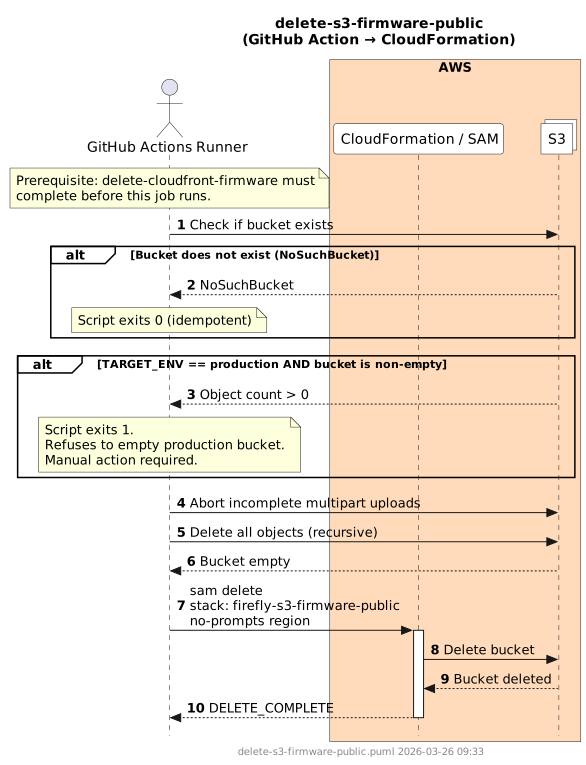
Before deleting the CloudFormation stack, a Python pre-deletion script handles bucket cleanup. The script is environment-aware: on production, it refuses to empty a non-empty bucket and exits with code 1. On non-production environments, or if the bucket is already empty, it recursively deletes all objects, aborts any incomplete multipart uploads, and then calls sam delete. A NoSuchBucket error (bucket already deleted) is handled gracefully.
Steps
- Configure AWS credentials
- Install SAM CLI
- Run pre-deletion Python script:
- Check if bucket exists (handle
NoSuchBucket→ exit 0) - If
TARGET_ENV=productionand bucket is non-empty → exit 1 (refuse) - Abort incomplete multipart uploads
- Delete all objects recursively
- Check if bucket exists (handle
sam delete --stack-name firefly-s3-firmware-public --no-prompts --region
Sequence Diagram
Failure Scenarios
| Scenario | Cause | Resolution |
|---|---|---|
| Production bucket is non-empty | Pre-deletion script exits 1; refuses to empty production bucket | Manually verify the bucket contents, empty it via the AWS console or CLI, then re-run |
NoSuchBucket | Bucket was manually deleted before the workflow ran | Script handles this gracefully and exits 0 |
| Incomplete multipart uploads blocking empty | Stale multipart uploads prevent clean deletion | Script calls abort-incomplete-multipart-uploads automatically; re-run if any uploads were added concurrently |
DELETE_FAILED — CloudFront origin still active | CloudFront distribution was not deleted before the bucket | Ensure delete-cloudfront-firmware completed successfully |