cognito
Overview
Provisions the Cognito User Pool with Google IdP federation, a custom auth domain, a pre-signup Lambda trigger, and app client configuration for the web UI. The deploy workflow is the most complex in the suite: it handles ROLLBACK_COMPLETE recovery, a Route 53 workaround required for Cognito custom domain validation, and post-deploy Route 53 alias creation. The delete workflow explicitly removes the retained User Pool that CloudFormation leaves behind.
CloudFormation Stack
firefly-cognito
Dependencies
Deploy
acm— providesCertificateArnfor the Cognito custom domainfunc-cognito-pre-signup— providesPreSignUpLambdaArnfor the User Pool trigger
Delete
delete-api-gateway— API Gateway JWT authorizer references the User Pool; must be deleted first
Required By
Deploy
api-gateway— usesCognitoUserPoolIdandCognitoUserPoolClientIdoutputs for the JWT authorizerfunc-api-users-get— needs Cognito for user lookupfunc-api-users-delete— needs Cognito for user deletionfunc-api-users-patch— needs Cognito for user updatesui-app— needs User Pool Client ID for UI auth configuration
Delete
delete-func-cognito-pre-signupdelete-acm
Deploy Workflow
Description
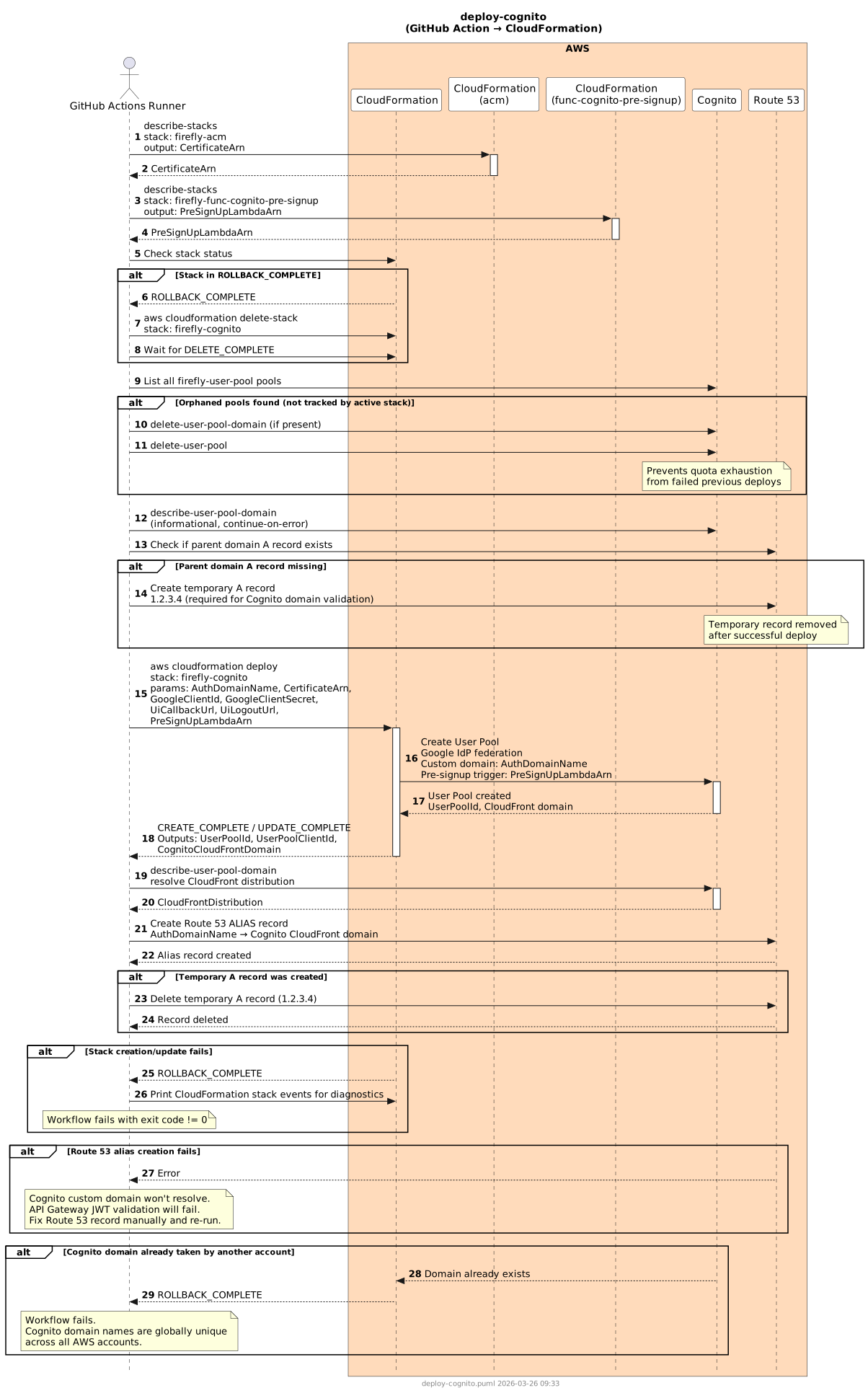
The deploy workflow follows a multi-phase process to handle Cognito's unique requirements:
- ARN lookups — Resolve
CertificateArnandPreSignUpLambdaArnfrom their respective stacks before any mutation begins. - ROLLBACK_COMPLETE recovery — If the stack is in
ROLLBACK_COMPLETE, delete it and wait forDELETE_COMPLETEbefore proceeding. - Orphaned pool and domain cleanup — Any
firefly-user-poolpools not currently tracked by the active stack are deleted (including their custom domains). The custom auth domain is also deleted if it is attached to a different (orphaned) pool. If the domain is already attached to the current stack's pool it is left alone — deleting it unconditionally would cause CloudFormation to skip recreation when no other stack changes are present, leaving the domain gone and breaking the Route 53 alias step. - Diagnostic check — Log the current Cognito custom domain status (informational only;
continue-on-error). - Route 53 parent domain workaround — Cognito requires the parent domain to have an A record before it will accept a custom domain. If the A record is missing, a temporary
1.2.3.4placeholder is created. This record is removed after deploy. - CloudFormation deploy — Deploys the User Pool with Google IdP, custom domain, pre-signup trigger, and app client. CloudFormation events are printed on failure for diagnostics.
- Route 53 alias creation — After the stack deploys, the Cognito custom domain resolves to a CloudFront distribution managed by Cognito. An ALIAS record must be created manually because Cognito cannot manage Route 53 records itself.
- Temporary A record removal — If step 5 created a temporary A record, it is deleted now.
Steps
- Checkout repository
- Configure AWS credentials
- Lookup
CertificateArnfromfirefly-acmstack output - Lookup
PreSignUpLambdaArnfromfirefly-func-cognito-pre-signupstack output - Check stack status — if
ROLLBACK_COMPLETE, delete stack and wait - Delete orphaned
firefly-user-poolpools not tracked by the active stack; delete the auth domain only if it is attached to a different (orphaned) pool — skip if it matches the current stack's pool - Diagnose existing Cognito domain (informational,
continue-on-error) - Check Route 53 for parent domain A record; create temporary
1.2.3.4A record if missing aws cloudformation deploy— stack:firefly-cognito; params:AuthDomainName,CertificateArn,GoogleClientId,GoogleClientSecret,UiCallbackUrl,UiLogoutUrl,PreSignUpLambdaArn; print stack events on failure- Create Route 53 ALIAS record:
AuthDomainName→ Cognito CloudFront domain (fromdescribe-user-pool-domain) - Delete temporary A record if it was created in step 8
Sequence Diagram
Delete Workflow
Description
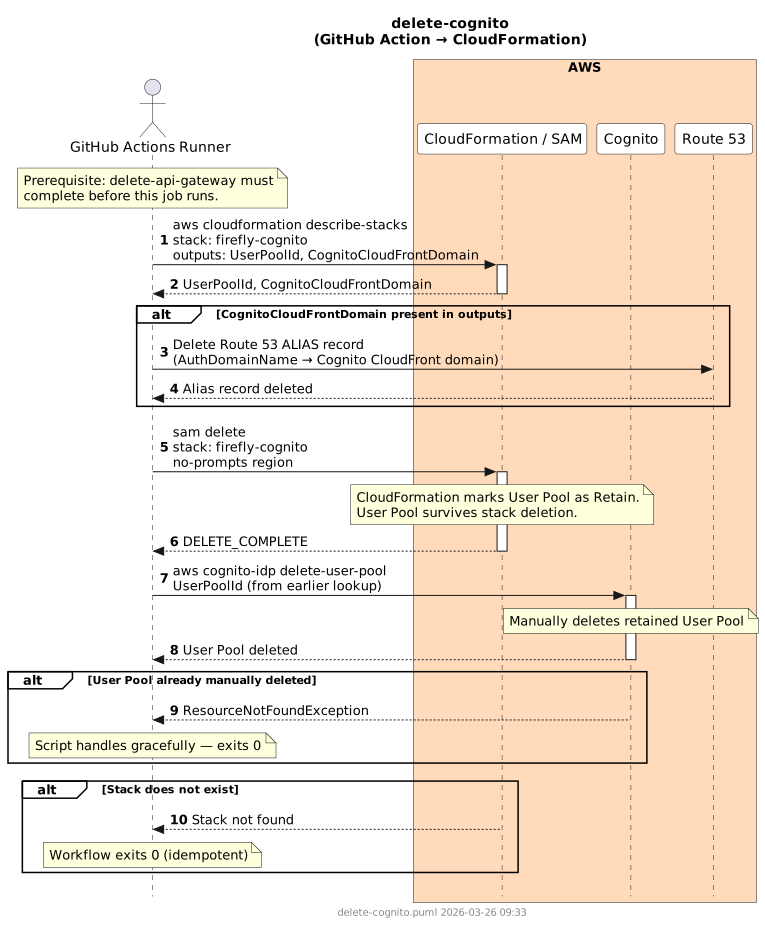
The delete workflow must undo the Route 53 alias that was created outside CloudFormation, delete the stack, and then explicitly delete the retained User Pool. CloudFormation sets the User Pool resource with DeletionPolicy: Retain to prevent accidental data loss; the workflow calls aws cognito-idp delete-user-pool explicitly to clean it up.
Steps
- Configure AWS credentials
- Lookup
UserPoolIdfromfirefly-cognitostack output andCloudFrontDistributionfromdescribe-user-pool-domain - If a CloudFront distribution is present, delete the Route 53 ALIAS record for
AuthDomainName aws cloudformation delete-stack --stack-name firefly-cognitoand wait forDELETE_COMPLETE- Delete all remaining
firefly-user-poolpools by name (including their custom domains) — handles theDeletionPolicy: Retainthat CloudFormation leaves behind
Sequence Diagram
Failure Scenarios
| Scenario | Cause | Resolution |
|---|---|---|
Stack in ROLLBACK_COMPLETE | Previous deploy failed and left stack in terminal state | Detected and handled automatically — stack is deleted before re-deploy |
| Parent domain missing A record | Cognito rejects custom domain if parent domain has no A record | Handled automatically — temporary 1.2.3.4 A record is created and removed after deploy |
Route 53 alias creation fails — CF_DOMAIN is empty or None | describe-user-pool-domain returned no CloudFront distribution. Most likely cause: the auth domain was deleted (orphaned domain cleanup) but CloudFormation made no stack changes, so it did not recreate the domain. | Re-run deploy-cognito — the guard will surface a clear error. If the domain is genuinely missing, delete the CF stack to force a full recreation, then re-run deploy-all. |
| Route 53 alias creation fails — other error | aws route53 change-resource-record-sets call fails post-deploy | Cognito custom domain won't resolve; API Gateway JWT validation will fail at runtime. Fix the Route 53 record manually and re-run the workflow. |
| Cognito domain already taken | Another Cognito pool in any AWS account owns the subdomain (globally unique) | Choose a different subdomain; cannot reclaim a domain owned by another account |
| User Pool not cleaned up after stack deletion | Manual delete step fails if User Pool was already deleted externally | Script handles ResourceNotFoundException gracefully and exits 0 |