dynamodb-firmware
Overview
Provisions the DynamoDB table that stores firmware metadata. The table is the central data store for all firmware lifecycle operations — upload validation, status transitions, OTA queries, and deletion events all read and write this table.
CloudFormation Stack
firefly-dynamodb-firmware
Dependencies
Deploy
None — this workflow has no prerequisites.
Delete
None — this stack can be deleted in parallel with most other stacks.
Required By
Deploy
func-api-firmware-get— reads firmware recordsfunc-api-firmware-status-patch— updatesrelease_statusfunc-api-firmware-delete— deletes recordsfunc-api-ota-get— queries for next RELEASED versionfunc-s3-firmware-uploaded— writes initial record on uploadfunc-s3-firmware-deleted— sets DELETED status with TTL
Delete
None.
Deploy Workflow
Description
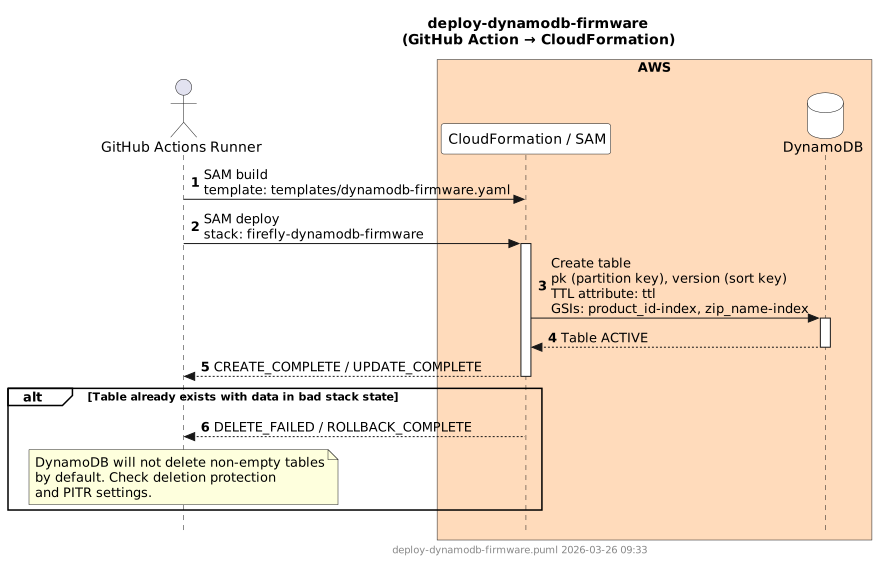
Builds the SAM template and deploys the firefly-dynamodb-firmware CloudFormation stack. The table uses a composite primary key: pk (partition key, format: product_id#application) and version (sort key). Two GSIs support efficient lookups by product_id and zip_name. A TTL attribute (ttl) enables automatic expiry of DELETED records after 10 days.
Steps
- Checkout repository
- Configure AWS credentials
- Install SAM CLI
sam build— template:templates/dynamodb-firmware.yamlsam deploy— stack:firefly-dynamodb-firmware; params:DynamoDbFirmwareTableName(fromvars.DYNAMODB_FIRMWARE_TABLE_NAME)
Sequence Diagram
Delete Workflow
Description
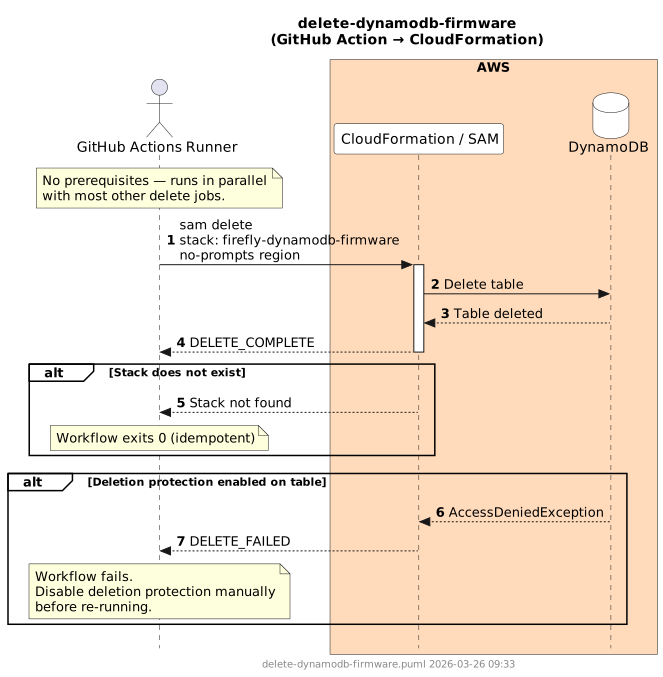
Deletes the firefly-dynamodb-firmware CloudFormation stack. The table is deleted with the stack. No pre-deletion cleanup is required — the stack can run in parallel with most other delete jobs.
Steps
- Configure AWS credentials
- Install SAM CLI
sam delete --stack-name firefly-dynamodb-firmware --no-prompts --region
Sequence Diagram
Failure Scenarios
| Scenario | Cause | Resolution |
|---|---|---|
| Stack in bad state with existing table data | DynamoDB by default will not delete a non-empty table during stack rollback | Check whether deletion protection is enabled; if not, manually empty or delete the table, then re-run |
| Deletion protection enabled | Stack deletion fails because DynamoDB refuses to drop the table | Disable deletion protection in the console, then re-run |
| PITR (Point-in-Time Recovery) delay | Some account configurations block immediate deletion when PITR is active | Disable PITR on the table before deleting the stack |