Authentication
The FireFly Cloud management console uses AWS Cognito with Google as the sole identity provider. Users sign in with their Google account — no passwords are stored or managed by FireFly.
How it Works
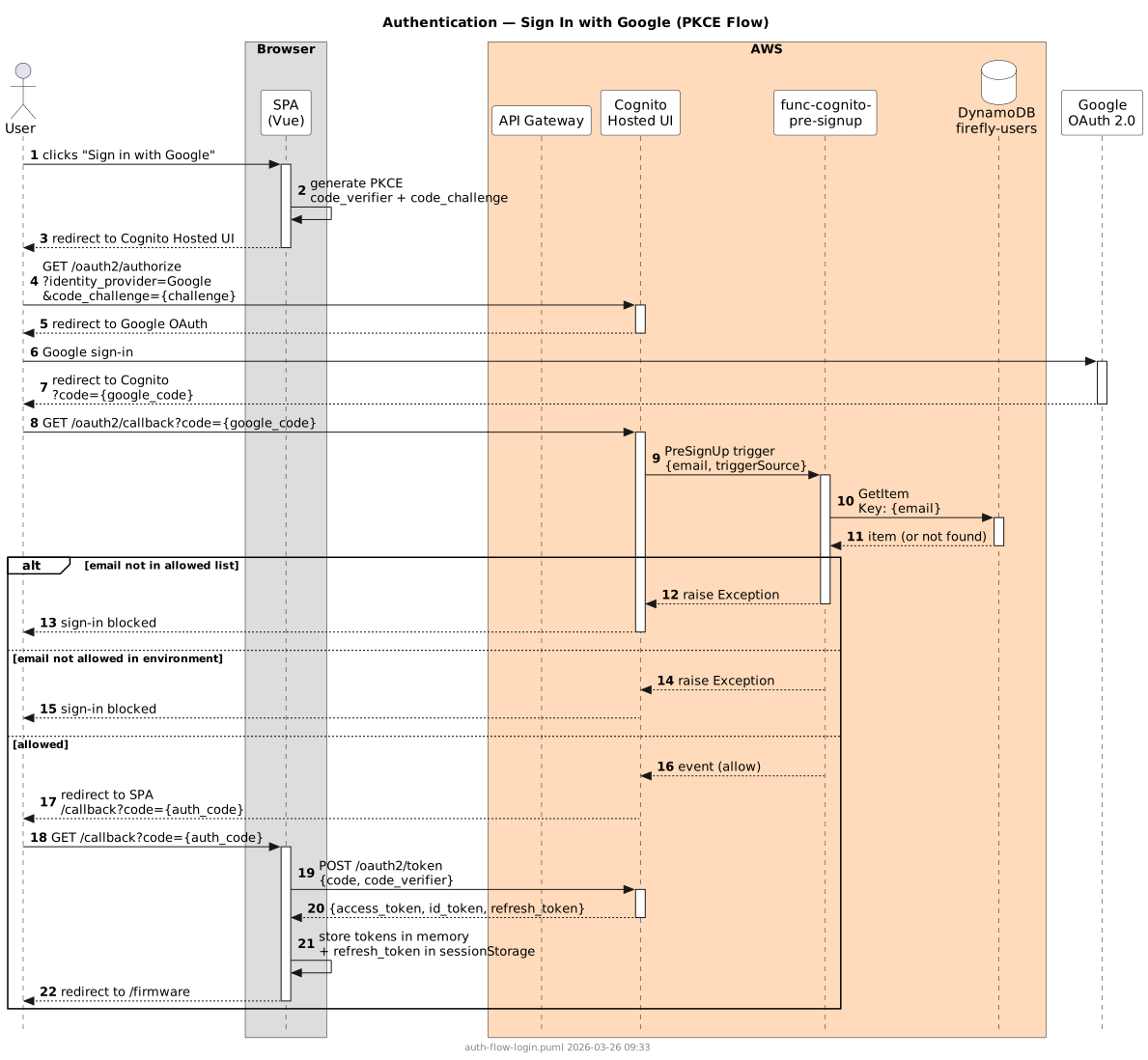
Sign-in uses the OAuth 2.0 authorization code flow with PKCE. The browser never receives client secrets; all token exchange happens directly between the browser and Cognito.
- User clicks Sign in with Google on the login page.
- The browser is redirected to the Cognito hosted UI, which forwards to Google's OAuth consent screen.
- After Google authentication, Cognito fires the pre-signup Lambda trigger, which checks whether the user's Google email address is on the allowed list for this environment.
- If permitted, Cognito issues an authorization code and redirects back to
/callbackin the SPA. - The SPA exchanges the code for an access token, ID token, and refresh token.
- Subsequent API requests carry the access token as a
Bearertoken in theAuthorizationheader.
Session Handling
| Token | Storage | Lifetime |
|---|---|---|
| Access token | In-memory (cleared on page reload) | 1 hour |
| ID token | In-memory | 1 hour |
| Refresh token | sessionStorage (cleared on tab close) | 30 days |
The access token is refreshed automatically when the user navigates to a new page and the token has expired, as long as a valid refresh token is available. There is no background refresh timer — inactive sessions are not extended.
When an API call returns 401, the session is cleared and the user is redirected to the login page.
Access Control
Invitation-Only Access
Users cannot self-register. A super user must first add a user's Google email address to the allowed list via the Users management section. Once added, the user can sign in with Google for the first time.
Super Users
Super users have access to the Users management section and can:
- Invite new users
- Delete users
- Grant or revoke super user status
The super user constraint ensures at least one super user always exists. The last super user cannot be deleted or demoted.
Super user status is stored in the Cognito super_users group. The first super user must be added manually via the AWS Cognito console (see Development Environment).
Environment Access
Each user's allowed list entry includes a list of environments (e.g. dev, production). The pre-signup Lambda checks that the user's email is permitted for the environment the deployment is running in. A user can be granted access to one or both environments independently.
API Authorization
All API endpoints require a valid Cognito JWT access token except:
| Endpoint | Auth Required | Reason |
|---|---|---|
GET /ota/{product_id}/{application} | No | Called directly by devices |
GET /health | No | Infrastructure monitoring |
| All other endpoints | Yes | Management console only |
Google Cloud Setup
See Development Environment → Google Cloud Setup for the one-time steps required to configure Google as a Cognito identity provider.