s3-ui
Overview
Provisions the S3 bucket used to store the web UI static assets. The bucket is fronted by the cloudfront-ui CloudFront distribution and its contents are synced by the ui-app workflow on each deploy.
CloudFormation Stack
firefly-s3-ui
Dependencies
Deploy
None — this workflow has no prerequisites.
Delete
delete-cloudfront-ui— the CloudFront UI distribution must be deleted first (which itself requiresdelete-ui-app)
Required By
Deploy
cloudfront-ui— bucket name is passed as a parameter to the CloudFront UI stack
Delete
None.
Deploy Workflow
Description
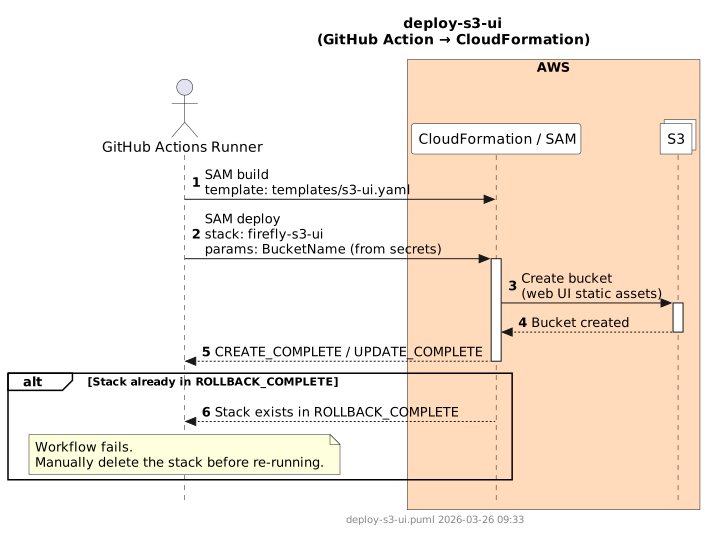
Builds the SAM template and deploys the firefly-s3-ui CloudFormation stack.
Steps
- Checkout repository
- Configure AWS credentials
- Install SAM CLI
sam build— template:templates/s3-ui.yamlsam deploy— stack:firefly-s3-ui; params:BucketName(from secrets)
Sequence Diagram
Delete Workflow
Description
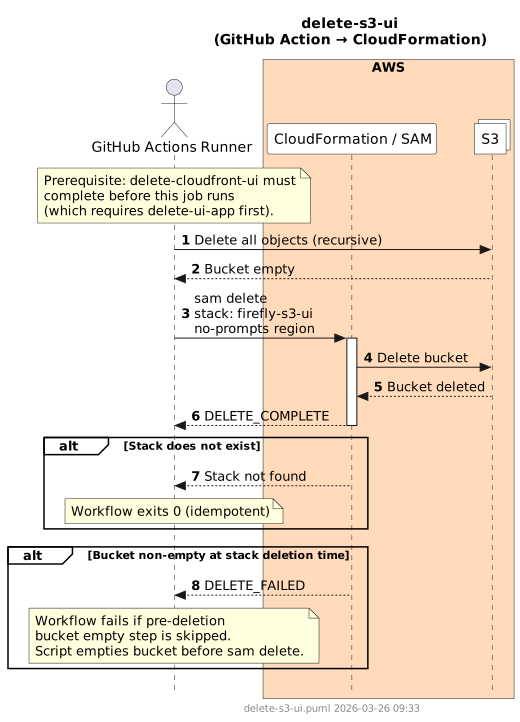
Empties the S3 bucket before deleting the CloudFormation stack. Unlike s3-firmware-public, there is no production guard — the bucket is always emptied before stack deletion. The CloudFront UI distribution must already be deleted so there are no active origins referencing the bucket.
Steps
- Configure AWS credentials
- Install SAM CLI
- Delete all objects in the bucket recursively
sam delete --stack-name firefly-s3-ui --no-prompts --region
Sequence Diagram
Failure Scenarios
| Scenario | Cause | Resolution |
|---|---|---|
| Bucket non-empty at stack deletion time | Bucket empty step skipped or failed; CloudFormation cannot delete a non-empty bucket | The workflow empties the bucket before calling sam delete; re-run the workflow if the empty step failed |
DELETE_FAILED — CloudFront origin still active | delete-cloudfront-ui did not complete before this job | Ensure the CloudFront UI distribution is fully deleted, then re-run |