Receiver
The receiver connects to one or more readsb TCP streams (raw ADS-B format), parses each frame to extract the ICAO hex identifier, wraps the message in a typed InboundMessage envelope, and hands it to a single dedicated thread that publishes it to RabbitMQ's consistent-hash exchange keyed by that hex. The source threads never touch RabbitMQ themselves — they drop each parsed message on an in-memory queue and loop straight back to the socket, so getting messages off the wire is never delayed by the broker or by backlog drain. When RabbitMQ is unavailable the receiver writes to a local SQLite fallback queue and drains it automatically on reconnect. One receiver container handles all configured sources concurrently (one thread per source).
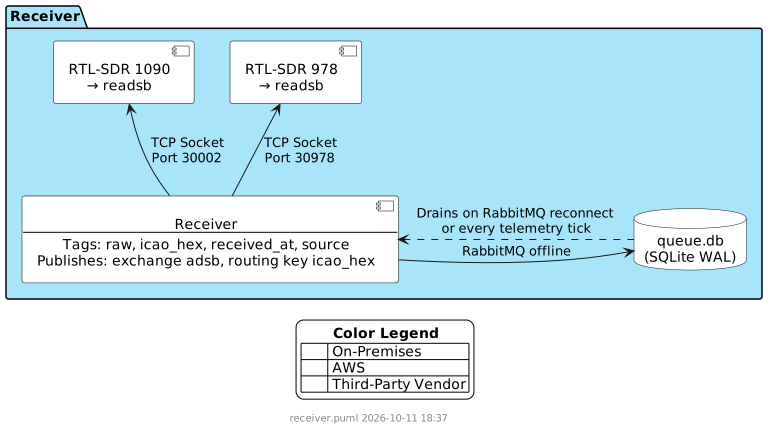
Configuration
Reads its configuration from environment variables via shared/config.py's load_config("receiver", "rabbitmq", "mqtt", "telemetry"). The shared connection settings (RABBITMQ_*/MQTT_*/REDIS_*/LOG_LEVEL) are interpolated by Compose from this host's .env (written by scripts/install.sh); RECEIVER_NAME and RECEIVER_SOURCES live in each instance's own receivers/{name-slug}.env, not .env — see Running Multiple Receiver Instances.
| Variable | Required | Default | Description |
|---|---|---|---|
RECEIVER_NAME | ✅ | — | (per-instance receivers/{name-slug}.env, not .env) Operator-chosen name for this receiver. With REDIS_HOST set below, this is the receiver's real identity -- claimed via Redis SET NX on first boot, then persisted forever after (see Receiver Identity). With REDIS_HOST unset, it's purely a Home Assistant display label (device name/model) in place of the generic Receiver {short-id} fallback, and has no bearing on MQTT topic addressing or HA entity identity, which stay keyed by the generated UUID instead. Sensors don't repeat this in their own names either way -- has_entity_name: true has Home Assistant compose each entity's displayed label from the device name plus the sensor's own short name. |
RECEIVER_SOURCES | ✅ | — | (per-instance receivers/{name-slug}.env, not .env) Comma-separated host:port:source triples (see below). At least one is required. |
RABBITMQ_HOST | ✅ | — | |
RABBITMQ_PORT | ❌ | 5672 | |
RABBITMQ_USERNAME | ✅ | — | |
RABBITMQ_PASSWORD | ✅ | — | |
MQTT_HOST | ❌ | — | Leave unset to disable MQTT entirely |
MQTT_PORT | ❌ | 1883 | |
MQTT_USERNAME | ❌ | — | Optional MQTT auth; leave unset for an anonymous broker |
MQTT_PASSWORD | ❌ | — | |
REDIS_HOST | ❌ | — | Leave unset to disable the receiver's Redis-backed identity claim, per-connection message counters, and core-health registration entirely -- see Receiver Identity and Redis-Backed Message Counters |
REDIS_PORT | ❌ | 6379 | |
REDIS_PASSWORD | ❌ | — | |
LOG_LEVEL | ❌ | info | "debug" for verbose output |
Timing values (MQTT publish cadence, heartbeat refresh/TTL, reconnect backoff) are not environment variables -- they are fixed constants in shared/timing.py. See Timing and cadences.
queue.db (the RabbitMQ offline fallback) is always written to /app/data, a fixed, non-configurable bind mount -- see docker-compose.receiver.yaml.
RECEIVER_SOURCES
Comma-separated host:port:source triples, parsed by shared/config.py's parse_receiver_sources(). Each triple's source is the tag applied to every message from that stream: one of 1090, 978, or EXTERNAL (case-insensitive).
Example, the SDR-hosting receiver (e.g. on the Raspberry Pi):
RECEIVER_SOURCES=192.168.1.10:30002:1090,192.168.1.10:30978:978An EXTERNAL source does not need to be co-located with the receiver's SDR hardware — it's a plain TCP connection like any other source, so its host can point at any other Beast/raw-Mode-S TCP feed. EXTERNAL frames use the same raw Mode S format as 1090, so no separate parsing is required. Nothing prevents adding an EXTERNAL triple to the same RECEIVER_SOURCES list above; a second, independent receiver instance is also an option (see Running Multiple Receiver Instances below) — message routing is keyed on icao_hex, not receiver identity, so either shape publishes into the exact same pipeline with no special handling on the message processor side.
Receiver Identity
Each receiver container needs a stable identifier to distinguish it from any other receiver publishing to the same MQTT broker -- included in every MQTT topic it publishes (SkyFollower/receiver/{id}/...) and in its HA identifiers/unique_id. This used to be a manually-set RECEIVER_ID environment variable, which had no way to enforce that an operator actually set it, or set it uniquely.
With REDIS_HOST set, RECEIVER_NAME itself becomes that stable identity, claimed via Redis the same way MESSAGE_PROCESSOR_ID is (see message-processor/README.md's own identity section): on first-ever boot the receiver SETs skyfollower-receiver-{RECEIVER_NAME} with NX, so a second receiver misconfigured with the same name fails to start with a clear "already claimed" error instead of silently colliding. A successful claim is persisted to {data_dir}/receiver_id (the same host-mounted directory queue.db lives in) and reused on every subsequent restart -- that restart makes zero Redis calls to resolve its identity, which is what lets a receiver keep capturing and locally-queueing traffic through a total Redis (and RabbitMQ) outage. Only the very first boot needs Redis reachable; if it isn't, the receiver refuses to start rather than falling back to something unverified. Once claimed, a background thread refreshes the claim's TTL every HEARTBEAT_INTERVAL_SECONDS (mirroring the message processor's own heartbeat exactly) so a genuinely-dead receiver's name frees up for reuse while a live one never loses it.
With REDIS_HOST unset, none of the above applies: the receiver generates a UUID on first startup and persists it to {data_dir}/receiver_id instead, reusing it on every subsequent restart. No configuration needed, no collision risk, and it's fully decoupled from RECEIVER_NAME, which stays purely cosmetic in this mode -- renaming a receiver never changes its underlying identity or orphans its MQTT/HA history.
Because identity is either generated per instance (keyed off that instance's own data_dir volume) or claimed against a name the operator is responsible for choosing uniquely, two or more receivers sharing the same MQTT broker or RabbitMQ never risk an identity collision -- including two running on the same host, below.
Redis-Backed Message Counters
With REDIS_HOST configured, each sources[] connection also gets two cross-restart-durable cumulative message counts -- messages_{host}_{port}_total_hour and _total_today -- for a source too sparse for the existing 30-second messages_{host}_{port}_per_second rate to say anything useful about. A third count, messages_{host}_{port}_total_lifetime, is always published (Redis or not) but is a different kind of figure -- see below.
The per-message hot path (_RateTracker.record()) stays pure in-memory arithmetic; nothing there ever touches Redis or checks the clock. The hour/today counts are flushed to Redis from the same background thread that already handles telemetry, on the fixed MQTT_PUBLISH_INTERVAL_SECONDS cadence -- purely time-based, with no message-count trigger, so a burst of traffic just produces one larger INCRBY on the next tick rather than an early flush. The actual increment-with-expiry-only-on-creation is shared/lua/incr_period_counter.lua, shared with the message processor's own equivalent counters -- called via EVALSHA so the exists-check, increment, and conditional EXPIREAT are one atomic round-trip.
The receiver does not publish the hour/today topics itself. It only feeds the Redis counters; core-health reads those and is the sole publisher of both the messages_*_total_{hour,today} MQTT values and their Home Assistant discovery config. That keeps one owner per topic -- previously the receiver also published them from its own in-memory running totals, and two retained publishers on the same topic, on two unsynchronized 30-second timers, made the sensor flap between a Redis-accurate and an in-memory value. As a consequence, with REDIS_HOST unset there is no core-health path and those two sensors simply don't exist -- the per-second rate, the per-connection state topics, and the lifetime counter below are unaffected either way.
messages_{host}_{port}_total_lifetime is by design a device-local, resets-on-restart figure. It is a running total for this receiver process's own lifetime, held only in memory, never written to or read from Redis, and published directly by the receiver the same way messages_{host}_{port}_per_second is. Restarting a receiver container resets it to zero for every connection on that receiver -- that is intended: it answers "how many messages has this connection handled since it last came up", not "since the receiver was first installed". Its HA discovery uses state_class: total_increasing, the correct semantics for a counter that legitimately resets on a device restart. The hour/today counters are unaffected by a restart (still Redis-backed, still correct across it).
Redis is entirely optional for the receiver's core function -- an unset REDIS_HOST means none of the identity-claim/heartbeat/counter/core-health-registration behavior above runs at all, and the receiver behaves exactly as it always has (generated-UUID identity, no Redis interaction whatsoever).
Running Multiple Receiver Instances
The receiver follows message-processor's pattern for running more than one instance on a host: one fixed folder (~/SkyFollower/receiver/), one shared .env, and one env file plus one generated service per instance.
docker-compose.receiver.yaml as fetched from the repo is static and re-fetched on every install and upgrade: a fixed name: skyfollower-receiver, the x-receiver-environment anchor (the shared RabbitMQ/MQTT/Redis settings), and one profile-gated receiver template service (image, restart policy, tmpfs, healthcheck) that never runs on its own. scripts/install.sh writes, per instance:
receivers/{name-slug}.env(mode0600) withRECEIVER_NAMEandRECEIVER_SOURCES-- the only two values that differ per instance.RECEIVER_NAMEkeeps its original casing (the Home Assistant label and the RedisSET NXidentity use it verbatim); the lowercased slug is used only for the file name, service name, container name, and data directory.- A
skyfollower-receiver-{name-slug}service in the generateddocker-compose.instances.yaml, which extends the template and addscontainer_name,env_file: ./receivers/{name-slug}.env, andvolumes: - ./data/skyfollower-receiver-{slug}:/app/data-- so each instance's fallback queue andreceiver_idfile (data/skyfollower-receiver-{slug}/receiver_id) stay independent. The role's.envsetsCOMPOSE_FILEto both files.
The shared x-receiver-environment values apply to every instance, so RabbitMQ/MQTT/Redis host and credentials are genuinely shared across every receiver on the host (the same assumption message-processor already makes).
To add another receiver on the same host, re-run the installer for the receiver role -- it prompts only for the new instance's name and sources, writes its env file and service, and leaves the already-running ones untouched:
./scripts/install.sh --role receiver
# Receiver name (Home Assistant label + Redis identity) [ATTIC-PI]: MLAT-VPS
# RECEIVER_SOURCES: mlat.example:30003:EXTERNAL
# Add another receiver on this host? [y/N]: n
or, without cloning anything first:
curl -fsSL https://raw.githubusercontent.com/BrentIO/SkyFollower/main/scripts/install.sh | bash(A single-receiver install still produces a named service, skyfollower-receiver-{slug}, not a bare receiver service -- the folder is the fixed name, not the service.)
Keep in mind each instance is a full copy of the container -- one thread per RECEIVER_SOURCES connection, its own RabbitMQ connection, its own MQTT connection -- so host resource limits, not anything in the compose files, become the real ceiling on how many can run on one host.
Upgrading an install that holds generated service blocks
An earlier layout kept each instance's RECEIVER_NAME/RECEIVER_SOURCES as literals in generated service blocks inside docker-compose.receiver.yaml. install.sh --upgrade converts that: before replacing the compose file it parses each block into receivers/{slug}.env, writes the matching services into docker-compose.instances.yaml, saves the original as docker-compose.receiver.yaml.bak, and updates COMPOSE_FILE in .env. Service names, container names and data directories are unchanged, so each receiver keeps its identity. The conversion is idempotent and never overwrites an existing env file.
Receivers installed under the even older ~/SkyFollower/{RECEIVER_NAME}/ layout are not restructured by --upgrade.
Routing
Every message is published to the durable skyfollower-adsb exchange with the aircraft's ICAO hex as the routing key. The exchange is of type x-consistent-hash (RabbitMQ's rabbitmq_consistent_hash_exchange plugin), which hashes that key and delivers the message to exactly one of the queues bound to it — one queue per message processor, each bound with a weight of 1. The same hex always lands on the same queue, so all messages for an aircraft reach the same message processor and its per-aircraft flight state, with no coordination between message processors.
The receiver has no idea how many message processors exist and never needs to be reconfigured or restarted when that number changes. Each message processor declares and binds its own queue; the exchange starts routing to it the moment the binding exists. The exchange name, type and arguments are defined once in shared/rabbitmq_topology.py and declared idempotently by both components on every connect.
The exchange carries an alternate-exchange argument pointing at the skyfollower-adsb-unroutable fanout exchange, which feeds the durable skyfollower-adsb-unroutable queue. Anything the hash exchange cannot route — which is everything published while no message processor queue is bound — ends up there. Without it those messages would be discarded silently, because the receiver publishes without publisher confirms and without the mandatory flag. A non-zero depth on skyfollower-adsb-unroutable means messages arrived with nothing bound to receive them.
Cutover to consistent-hash routing
An existing deployment's adsb-0, adsb-1, … queues are bound to the default exchange and do not migrate themselves. This is a one-time operational sequence with a single brief ingest gap. (The full operational runbook will live in the deployment documentation; this is the minimum needed to perform the cutover.)
- Stop the receiver(s). If a receiver's
local_queue_depthis non-zero, let it drain to zero before stopping — entries queued under the old routing carry an old-format target and are dead-lettered rather than published after the cutover. - Let the running message processors drain
adsb-0…adsb-{n-1}to zero. - Stop the message processors.
- Add
rabbitmq_consistent_hash_exchangetoenabled_pluginsand recreate the RabbitMQ container. - Start the message processors one at a time, in the intended slot order. Binding order establishes slot order permanently; this is the only moment it can be chosen deliberately.
- Start the receiver(s).
- Delete the now-empty
adsb-0…adsb-{n-1}queues.
Flights in progress at cutover split and are stitched back together by the archive processor, as with any resize.
Restarting, stopping and removing a message processor
Restarting is free. A binding is durable state held by RabbitMQ. A restarting message processor redeclares its queue and rebinds; the binding already exists, so the call is a no-op, slot order is untouched, and no aircraft moves. Host reboots, container recreation and rolling upgrades all cost nothing.
Stopping is not unbinding. Stopping a message processor leaves its queue and binding intact: its share of traffic accumulates in its queue and drains when it comes back — the existing, desirable behaviour. Unbinding (deleting the queue) removes its slot and renumbers every slot after it. The two look like the same action from the operator's side and are not.
Remove from the end, never the middle. Slots are positional. Removing the last-bound message processor moves about 20% of aircraft, redistributed evenly over the survivors; removing one from the middle moves about 68%, because the plugin uses Jump Consistent Hash over positional slots. Treat message processors as a stack: add and remove at the end.
None of that is data loss. Nothing is dropped and every message still routes and processes. In-progress flights for the reshuffled aircraft split — the old message processor's partial state ages out after flight_ttl_seconds and archives as one segment, the new one starts another — and the archive processor's split-flight stitching merges the adjacent segments. The cost is degraded archive quality for a few minutes.
Detecting a Dead Source Connection
The receiver only ever reads from a source socket — it never writes — so it never provokes an RST from the far end. If a source's peer vanishes without a clean close (a dump978-fa process that dies, a route that drops mid-stream), the read simply blocks and times out forever: recv() raises socket.timeout, the read loop continues, and the half-open socket is held indefinitely with the connection still reported as True. A sparse feed (978/UAT overnight) makes this indistinguishable from normal idle.
Every source socket therefore has TCP keepalive enabled with tuned timers, applied the moment the connection opens, covering the 1090 and 978 readers alike:
| Setting | Value | Meaning |
|---|---|---|
SO_KEEPALIVE | on | Kernel probes an otherwise-idle connection |
TCP_KEEPIDLE | 60 s | Idle time before the first probe |
TCP_KEEPINTVL | 10 s | Interval between probes |
TCP_KEEPCNT | 3 | Unanswered probes before the socket is dropped |
A dead peer is detected in roughly 60 + (10 × 3) ≈ 90 seconds (often sooner — a peer with no record of the connection answers the first probe with an RST at ~60 s). Once the kernel tears the socket down, recv() raises OSError and the existing reconnect path in _source_loop takes over, logging the reconnect and incrementing {host}_{port}_reconnect_count.
Keepalive is used rather than an application-level idle deadline precisely because it does not false-positive on a genuinely quiet-but-healthy feed: a live peer answers the probes, so an overnight lull with zero UAT traffic keeps the connection up instead of forcing needless reconnect churn. TCP_KEEPIDLE/TCP_KEEPINTVL/TCP_KEEPCNT are Linux-only socket options (the containers run Linux); on a non-Linux host each is skipped individually and only the portable SO_KEEPALIVE is set. The three values are fixed constants, not configuration — correctness tuning, not deployment policy.
Publish Path and Thread Safety
pika.BlockingConnection (and the async transport underneath it) is not safe to call concurrently from more than one thread. Exactly one thread, rabbitmq (running _rmq_loop), ever touches the connection or channel — it owns process_data_events() and every basic_publish() call.
The source threads (one per configured sources[] connection) don't publish, and never do a disk write. Each parses a frame and hands (routing_key, payload, received_at) off for publishing, then immediately returns to sock.recv(). It never calls a pika method and never waits on the broker, so a slow, blocked or unreachable RabbitMQ cannot back-pressure the TCP socket and make readsb shed messages upstream.
Ordering: the self._backlogged gate (#1956)
Where a message actually lands is decided by one shared, in-memory flag, self._backlogged — not by whether the live queue happens to have room right now:
- Clear (the common case): a fresh message goes straight onto the bounded in-memory
queue.Queue— the live queue — no disk touched. - Set: every new message, no matter how much room the live queue has, is routed to a second bounded in-memory queue — the overflow queue — with the same non-blocking
put_nowait, and the source thread still returns to the socket at once. A dedicatedoverflow-writerthread is the sole consumer of the overflow queue: it batches messages into the SQLite fallback (queue.db) with oneexecutemany+ one commit per pass, so the fsync-class disk write stays off every socket-read thread. Only if the overflow queue also fills (the writer somehow can't keep pace) does a source thread take a direct synchronous fallback write itself — a last-resort pressure valve that a sustained outage does not normally reach, not the steady state it settles into.
The flag is set the instant a message can't go straight out — the live queue is unexpectedly full, or a basic_publish() call fails — and is only cleared once the rabbitmq thread confirms, in the same pass, that both the live queue and queue.db are fully drained to zero. Clearing on anything short of a confirmed empty drain (e.g. "queue.db is merely small now") would let a fresh message publish ahead of a handful of older rows still waiting there.
This is what prevents a backlog from being leapfrogged: once the flag is set, the live queue can never be topped up with content newer than whatever is still sitting in queue.db, so it only ever holds content that predates the backlog. That's what makes it safe for the rabbitmq thread to keep unconditionally draining the live queue first, exactly as it always has (see below) — nothing new can land there while a backlog exists to be leapfrogged in the first place. Before this gate existed, routing was decided purely by whether the live queue was full at that instant, which let ordinary post-recovery live traffic — freshly arriving, and therefore newer than anything left in queue.db — refill the live queue and publish ahead of the older backlog rows still queued behind it.
The rabbitmq thread's inner loop, while the connection is up:
- Pumps
process_data_events(time_limit=0)— heartbeats, and the broker'sConnection.Blocked/Unblockedsignals. - Publishes everything currently waiting on the live queue (bounded per pass only so step 1 keeps running under sustained load).
- Only when nothing is waiting live, advances the SQLite fallback backlog by one bounded batch (
_FALLBACK_DRAIN_BATCH_MAXrows, default 100), in oneSELECT+ oneDELETE/commitfor the batch, then loops straight back to step 2. A batch that emptiesqueue.dbwhile the live queue was also observed empty this same pass clearsself._backlogged.
A backlog drain of any size can never delay a live message by more than _FALLBACK_DRAIN_BATCH_MAX basic_publish() calls, because backlog rows are only ever pulled on a pass where the live queue was observed empty, and the live queue is re-checked between every batch (never mid-batch). That constant is a live-latency budget — deliberately two orders of magnitude below the live queue's own per-pass cap — not a throughput-maximising number; it exists because draining one row per pass capped post-outage catch-up at roughly one SQLite commit per message. blocked_connection_timeout on the connection bounds the one case pika can still stall in — the broker holding publishers blocked on a resource alarm while the socket stays up — by tearing the connection down so the loop reconnects and re-validates.
A separate, purely informational signal — backlog_age_seconds, published in telemetry — tracks how old the last published message was at publish time. It never gates routing; it exists only so an operator (or the map service, or the message processor) can see how far behind the receiver currently is.
Fault Tolerance
When RabbitMQ is unavailable (at startup or after a disconnect), messages are written to queue.db (SQLite WAL mode) in data_dir via the shared FallbackQueue (see shared/README.md). Since that class is payload-only, the receiver wraps {routing_key, payload} into one JSON string before queueing it, and unwraps it again on drain — persisting the routing key alongside the payload keeps the drain path identical to the live publish path, with no need to re-parse a stored message body to work out where it was going.
A publish failure — whether of a live message or a backlog row — persists that message to queue.db and latches the connection unhealthy; the rabbitmq thread then tears the connection down and reconnects, re-validating the flag (a broker holding publishers blocked keeps process_data_events() succeeding, so the flag, not a connection exception, is what drives the reconnect). Draining is intrinsic to the publish loop — it works a backlog batch on every pass where no live message is waiting, for as long as the connection holds — so there is no separate periodic drain trigger. If RabbitMQ drops mid-batch, whatever rows already published in that batch are deleted, the rest stay queued, and draining resumes oldest-first on the next reconnect.
Messages buffered in the in-memory live queue during a brief outage are lost if the process is killed before it reconnects (a bounded amount — see _LIVE_QUEUE_MAXSIZE). Once that buffer fills, further messages go to the overflow queue and the overflow-writer thread persists them to the durable queue.db in batches; on a clean shutdown the writer makes one final pass so nothing still buffered in the overflow queue is dropped. A clean reconnect drains the in-memory live queue ahead of the disk backlog. FallbackQueue runs synchronous=NORMAL (WAL): a plain process crash still replays every committed row, only a host power loss can drop the last few — see shared/README.md.
Publishing uses no publisher confirms, so a backlog row is deleted once basic_publish() returns without raising, not once the broker durably acknowledges it. A crash between a successful publish and the batch's DELETE re-publishes those rows on restart — at-least-once, never lost. Batched draining widens that window from one row to at most _FALLBACK_DRAIN_BATCH_MAX; it is a difference of degree, not a new failure class, and the message processor already absorbs redelivered positions via an INSERT OR IGNORE on its (icao_hex, timestamp) index.
Dead-Lettering Poison Messages
A message that fails to publish on every drain attempt — not because RabbitMQ is down, but because something about that specific message causes a deterministic failure — would otherwise retry forever, and since drain() always re-selects the oldest row first, it would also block every other queued message behind it indefinitely. FallbackQueue tracks a per-row retry count: below the threshold (5, hardcoded), a failure behaves exactly as before — stop the drain pass, retry from the top next time. At the threshold, the row is judged permanently poison: it's written out as a standalone JSON file under dead_letters/queue/ in data_dir (capped at 100MB total, oldest file evicted first) for manual inspection, and the drain pass continues to whatever's queued behind it instead of stopping. There's no automated replay path — a dead-lettered file is purely something an operator inspects or discards out-of-band (data_dir is already a host-mounted volume, same as queue.db itself).
A raw attempt count alone isn't safe: the publish loop retries the head of the backlog on every reconnect, so a flapping connection reconnecting every few seconds could otherwise burn through the retry threshold within seconds — dead-lettering a message that was never actually poison, just unlucky enough to be at the head of the queue during a brief instability. FallbackQueue also enforces a minimum time between attempts on the same row (30 seconds, hardcoded, independent of how often it is re-drained), so reaching the threshold always takes a real, bounded amount of elapsed time — not just a burst of rapid reconnect attempts.
MQTT Topics Published
All topics use the root SkyFollower.
| Topic | Payload | Retained |
|---|---|---|
SkyFollower/receiver/{receiver_id}/status | ONLINE or OFFLINE | Yes |
SkyFollower/receiver/{receiver_id}/statistic/{name} | One retained topic per stat (see fields below) | Yes |
Statistic topic suffixes ({name}):
| Field | Format | Description |
|---|---|---|
messages_{host}_{port}_per_second | Float as string | Average message rate for one specific sources[] connection since last report |
messages_{host}_{port}_total_lifetime | Integer as string | Cumulative message count for that connection since this receiver process started — an in-memory figure, never Redis-backed, that resets to 0 on every receiver restart by design. See Redis-Backed Message Counters |
{host}_{port}_connected | True or False | Whether the TCP connection to that specific sources[] entry's readsb instance is currently open |
{host}_{port}_reconnect_count | Integer as string | Drop-and-retry cycles for that specific sources[] connection during the current flapping episode. Resets to 0 once a reconnection has held continuously for RECONNECT_COUNT_RESET_AGE_SECONDS (30 s) — so a connection that flapped last week but has been solid since reads 0, while one flapping now keeps climbing. A connection failing faster than that interval between attempts never resets mid-flap. |
{host}_{port}_connected_attributes | JSON, e.g. {"last_message_received": "2026-01-15T10:00:00+00:00"} | Home Assistant json_attributes_topic for the sibling {host}_{port}_connected sensor; carries when that specific sources[] connection last processed a message. Not published at all until the first message on that connection arrives |
local_queue_depth | Integer as string | Messages queued in the local SQLite fallback (queue.db) plus any still buffered in memory — the live queue awaiting the publisher thread and the overflow queue awaiting the overflow-writer thread |
dead_letter_queue_depth | Integer as string | Messages dead-lettered after repeatedly failing to publish (see Dead-Lettering Poison Messages) |
rabbitmq_connected | True or False | Whether an active RabbitMQ connection is held |
backlog_age_seconds | Float as string | How old the last message published to RabbitMQ was, at the moment it was published. Near 0 while caught up; grows while draining a backlog. Informational only -- see Ordering: the self._backlogged gate -- never consulted for routing |
started_at | UTC ISO-8601 timestamp | Process start time |
version | String | Running image version (VERSION env var, "dev" if unset) |
messages_{host}_{port}_total_{hour,today} is not in this table -- core-health publishes those two (value and HA discovery) from the Redis counters the receiver's flush feeds; see Redis-Backed Message Counters. The sibling _total_lifetime topic above is the receiver's own.
A messages_{host}_{port}_per_second, {host}_{port}_connected, {host}_{port}_reconnect_count, and (once traffic has been seen) {host}_{port}_connected_attributes topic are published for every connection listed in sources[] — keyed by connection (host/port), not by source tag, so two connections sharing the same tag (e.g. two EXTERNAL feeds) are tracked independently instead of being conflated. For example, { "host": "adsb.lol", "port": 30105, "source": "EXTERNAL" } publishes to messages_adsb.lol_30105_per_second, adsb.lol_30105_connected, adsb.lol_30105_reconnect_count, and adsb.lol_30105_connected_attributes.
Each stat is published as its own retained topic (not a combined JSON payload) every MQTT_PUBLISH_INTERVAL_SECONDS, except {host}_{port}_connected_attributes, which is itself a small JSON payload -- Home Assistant's json_attributes_topic mechanism for attaching extra attributes to a sensor doesn't have a plain-value equivalent.
Home Assistant autodiscovery payloads are published to homeassistant/sensor/SkyFollower_receiver_{receiver_id}_{field}/config on MQTT connect, with has_entity_name: true so Home Assistant composes each entity's displayed label from the device name plus the entity's own short name rather than the receiver's name being baked into every sensor name. Each sensor's state_topic points directly at its own SkyFollower/receiver/{receiver_id}/statistic/{field} topic — no value_template needed. The {host}_{port}_connected sensor additionally sets json_attributes_topic to its sibling {host}_{port}_connected_attributes topic, exposing a last_message_received attribute instead of a separate _last_message_at entity.
Adding or Changing readsb Sources
- Update
RECEIVER_SOURCESin.env— add, remove, or edithost:port:sourcetriples. - Restart the receiver container (
docker compose up -dpicks up the new.env).
Each source runs in its own thread; adding a source does not affect others. The source tag you choose is stamped on every message and carried through to the archived flight record.