Archive Processor
The archive processor consumes completed flight records from the RabbitMQ skyfollower-archive queue, writes each flight as gzip-compressed JSON to AWS S3, and writes a small per-flight Parquet index row alongside it in the same bucket, queryable via AWS Athena/Glue without needing to scan S3. When S3 is unavailable, completed flights are queued locally and drained automatically once S3 reconnects.
A flight's GeoJSON flight path (3D LineString, altitude interpolated from adjacent position reports where missing) is not stored — it's derivable from positions[] at any time, so shared/flight_path.py builds it on demand for any component that needs it (e.g. management-ui's flight-view feature) instead of archive-processor persisting a duplicate copy.
Configuration
Reads its configuration from environment variables via shared/config.py's load_config("rabbitmq", "redis", "mqtt", "s3", "telemetry"), interpolated by Compose from this host's .env (written by scripts/install.sh).
| Variable | Required | Default | Description |
|---|---|---|---|
RABBITMQ_HOST | ✅ | — | |
RABBITMQ_PORT | ❌ | 5672 | |
RABBITMQ_USERNAME | ✅ | — | |
RABBITMQ_PASSWORD | ✅ | — | |
REDIS_HOST | ✅ | — | |
REDIS_PORT | ❌ | 6379 | |
REDIS_PASSWORD | ✅ | — | Redis requires authentication; see shared/redis_client.py's build_redis_client() |
MQTT_HOST | ❌ | — | Leave unset to disable MQTT entirely |
MQTT_PORT | ❌ | 1883 | |
MQTT_USERNAME | ❌ | — | Optional MQTT auth; leave unset for an anonymous broker |
MQTT_PASSWORD | ❌ | — | |
S3_BUCKET | ✅ | — | S3 bucket name flights are written to |
AWS_DEFAULT_REGION | ✅ | — | boto3's own variable name -- no credentials are ever passed in code, so every client picks up the default credential chain. Shared with archive-compaction |
AWS_ACCESS_KEY_ID | ✅ | — | boto3's own variable name. docker-compose.archive.yaml maps this from the .env key ARCHIVE_PROCESSOR_AWS_ACCESS_KEY_ID -- a credential pair distinct from archive-compaction's, so the two run under their own least-privilege IAM identities |
AWS_SECRET_ACCESS_KEY | ✅ | — | boto3's own variable name. Mapped from the .env key ARCHIVE_PROCESSOR_AWS_SECRET_ACCESS_KEY |
LOG_LEVEL | ❌ | info | "debug" for verbose output |
Timing values (the MQTT publish cadence, the periodic s3.db drain cadence, reconnect backoffs, the stitch-pointer TTL) are not environment variables -- they are fixed constants in shared/timing.py. See Timing and cadences.
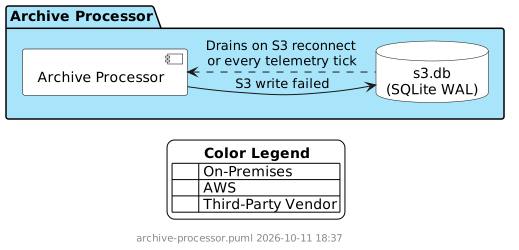
s3.db (the S3 offline fallback, and the Parquet-index write retry queue — see Fault Tolerance) is always written to /app/data, a fixed, non-configurable bind mount -- see docker-compose.archive.yaml.
Local Index Cache
Right after a flight's Parquet index row is successfully uploaded to S3 (both on the normal path and when a previously-failed row drains from the retry queue), the same bytes are also written to /app/index-cache, a second fixed bind mount shared with archive-compaction on the same host (docker-compose.archive.yaml). The local path mirrors the S3 key's own layout, minus the index/ prefix: /app/index-cache/year={YYYY}/month={MM}/day={DD}/{uuid}.parquet.
This exists purely so archive-compaction can read each row back from local disk instead of re-downloading it from S3 days later — see archive-compaction/README.md's own Local Index Cache section for the read side and the cleanup that keeps the shared volume from growing without bound. The local write is best-effort: a failure here is logged and otherwise ignored, never treated as an index write failure and never queued for retry — the S3 upload above already succeeded and is what makes the row durable; the local copy only ever saves archive-compaction a GetObject call.
flight_ttl_seconds is not an environment variable — it's read from config:flight_ttl_seconds in Redis (shared with the message processor) once at startup and cached; not hot-reloaded, restart the container to pick up a changed value. Defaults to 300 if unset. See Split-Flight Stitching below for how it's used.
Consuming from RabbitMQ
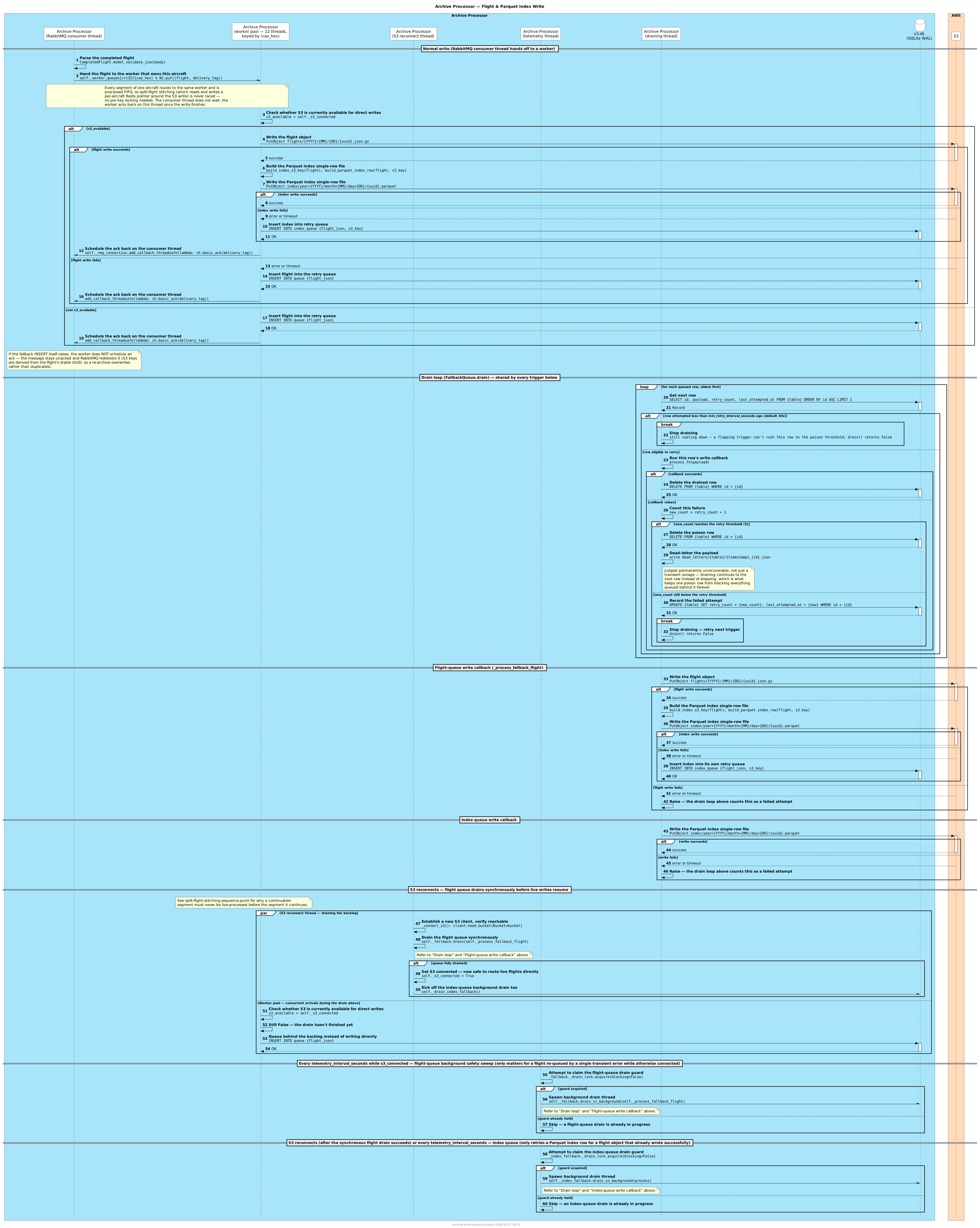
The archive processor declares and consumes from a single durable queue named skyfollower-archive (prefetch_count=100, manual ack). This is the queue the message processor publishes completed flights to — see message-processor/README.md. A message that fails to process is not requeued; instead it is written to the local fallback queue and acknowledged, to avoid poison-message retry loops. If even that local write fails the message is left unacked and the broker redelivers it (S3 keys derive from the flight's stable UUID, so a re-archive overwrites rather than duplicates).
Worker pool
A single pika BlockingConnection runs its message callback one at a time on one thread, and each flight does two or more sequential synchronous S3 round trips (~150–250 ms each from a self-hosted host) — so serial processing caps throughput at a few flights per second no matter how high prefetch_count is. Instead, the connection thread only parses each delivery and hands it to a pool of 12 worker threads that do the S3/Redis work concurrently; each worker marshals its basic_ack back onto the connection thread with connection.add_callback_threadsafe. boto3's connection pool (max_pool_connections) is widened to cover every worker.
Workers are partitioned by icao_hex (crc32(icao_hex) % 12): every segment of one aircraft is processed FIFO on the same worker. Split-flight stitching reads and writes a per-aircraft Redis pointer around the S3 write, so two segments for one aircraft must never run concurrently — routing by icao_hex guarantees that without any per-key locking. The fallback-drain path is unchanged: it stays strictly serial and oldest-first, and never runs the pool (see Fault Tolerance).
External-Only Flight Skip
Flights whose receiver_sources is exactly ["EXTERNAL"] are dropped instead of archived — not written to S3, and not queued to the local fallback either, since the drop is deliberate rather than deferred. A high-volume EXTERNAL feed can produce a very large number of tracked aircraft the user has no interest in, and S3 storage cost scales with what gets archived. Any mix that includes a non-EXTERNAL source (e.g. ["1090", "EXTERNAL"]) archives normally, since the aircraft was independently seen on a real receive path at some point.
force_archive: true on the flight (set by the message processor when any matched rule in config:rules carries a force_archive: true property — see message-processor/README.md) overrides the skip for external-only flights the user does care about, without having to archive every external contact indiscriminately. Skipped flights increment flights_skipped_hour/flights_skipped_today (see Statistics below).
Enrichment Backfill
The message processor enriches each flight once: aircraft/registrant when the flight is created, operator when its ident is confirmed. If Redis was down or didn't hold the data yet, the flight carries nothing (or only {icao_hex}) and nothing revisits it. So immediately before every write, _archive_flight_to_s3 makes one more best-effort attempt (_backfill_enrichment), before _try_stitch:
- Aircraft/registrant:
EVALSHAshared/lua/merge_aircraft.luaforaircraft.icao_hex, post-processed byshared/enrichment.py'ssplit_merged_aircraft()(the same helper the message processor uses). - Operator: RedisJSON
GET operator:{prefix}, with the same skip rules as the message processor's_enrich_operator(operator_lookup_prefix(): US tail number, ident equal to the registration, airline prefix shorter than 2 characters). The registration check sees any registration just backfilled above. Thesourcekey is stripped, as at publish time.
Only empty leaves are filled: missing, null, "", {} or []. Sub-objects are recursed into, so a missing powerplant.model is filled even when powerplant.type is set. 0 and false are data, and a field that already has a value is never changed, even if Redis now disagrees.
wake_turbulence_category,adsb_versionandemitter_categoryare receiver-decoded and never touched.aircraft.data_sourcestakes the fresh value (a superset) when any aircraft/registrant leaf was filled; otherwise it is left as is.military: falsefrom Redis is not added, matching the message processor's archive shape.
A Redis error is logged at debug and the flight is archived as-is: the backfill never delays, fails or requeues an archive, and there is no second attempt. Nothing is republished to the map or MQTT and rules aren't re-evaluated. Flights held in the S3 fallback queue are backfilled when they drain, not when queued, so they benefit from Redis having recovered. Stitching is unchanged: the backfill runs on the incoming segment only.
The number of leaves filled is counted in fields_backfilled_{hour,today,lifetime} (see MQTT Topics Published) after the S3 write succeeds, so a steady non-zero value means enrichment is regularly missing at flight start.
S3 Object Format
Each flight is written to:
flights/{YYYY}/{MM}/{DD}/{uuid}.json.gz{YYYY}/{MM}/{DD}— UTC date of the flight's first message, not its last. This key is only ever computed once, at first archive — a later split-flight stitch overwrites the object in place under this same key rather than recomputing it, so the date has to come from whichever timestamp stitching never changes.first_messageis exactly that (_merge_segmentsalways preserves the original segment'sfirst_message; onlylast_messageadvances with each stitched segment) — using it keeps the key stable across any number of stitches, even ones that happen to straddle a UTC day boundary. The Parquet index row's key follows the same rule, for the same reason (it's rebuilt on every stitch, unlike this object's key).{uuid}— the flight's_id(UUID-v7)
The key carries no icao_hex/ident segment — the Parquet index row already stores those as their own indexed columns, and no query path recovers them by parsing the key.
The object body is the completed flight record as-is (see shared/README.md for CompletedFlight) — no derived flight_path is added; a consumer builds it on demand from positions[] via shared/flight_path.py when it needs one. The payload is gzip-compressed before upload, with ContentType: application/json and ContentEncoding: gzip.
Split-Flight Stitching
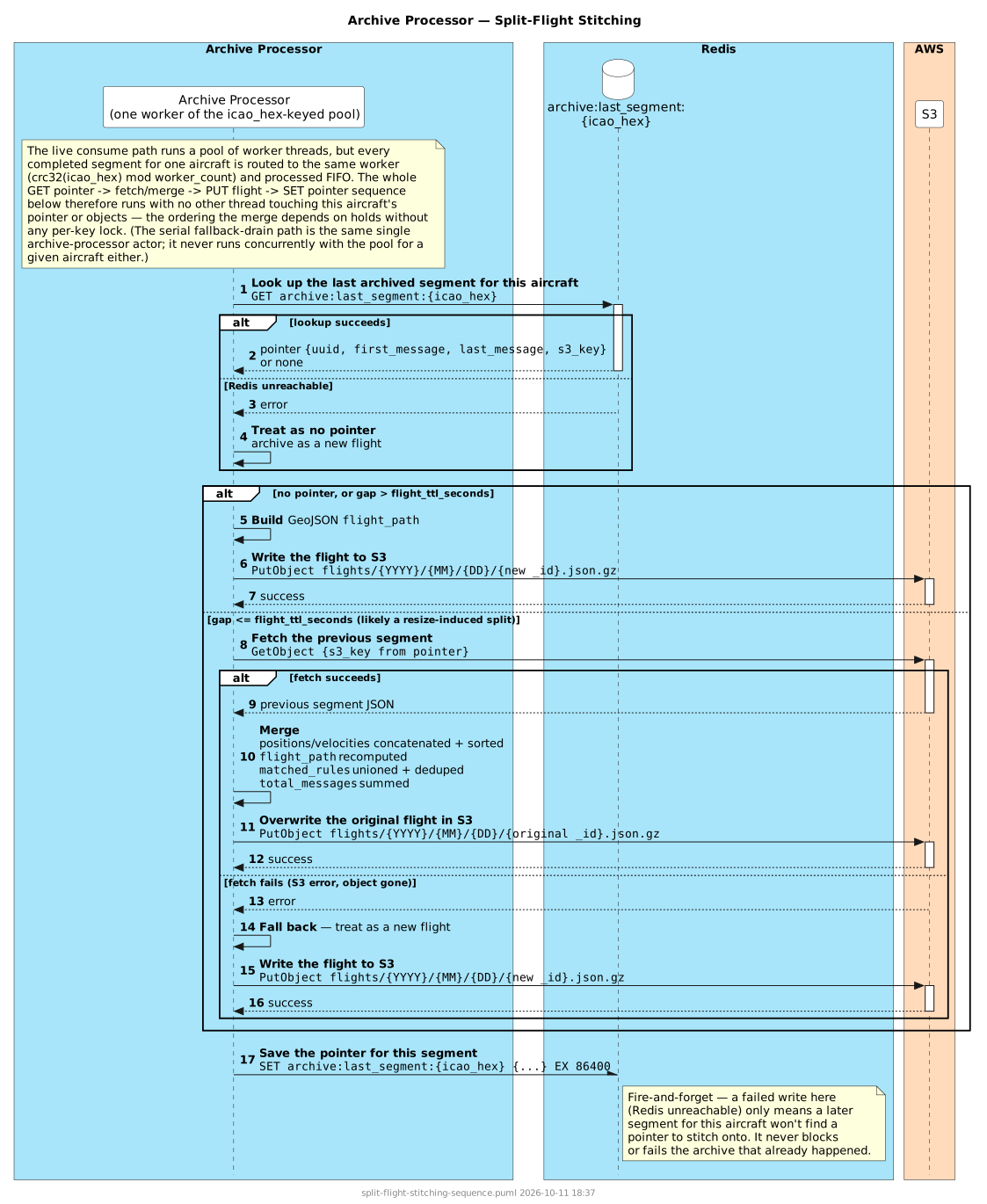
Resizing a deployment's message processor count reshuffles which message processor an aircraft routes to, which can force a flight to be archived early even though the aircraft keeps flying — the continuation shows up as a second, separate flight on whichever message processor it's now routed to. The archive processor detects and merges this after the fact:
- After archiving a flight, it writes a small pointer to Redis —
archive:last_segment:{icao_hex}(seeshared/redis_keys.py), containing the flight's_id,first_message,last_message, and S3 key. This expires after 1 day. - Before archiving the next flight for that aircraft, it checks for a pointer. If the new flight's
first_messageis withinflight_ttl_secondsof the pointer'slast_message, this is treated as a continuation rather than a new flight: the archive processor fetches the previous S3 object, merges the two segments — concatenated and re-sortedpositions/velocities, a deduped union ofmatched_rules, and summedtotal_messages— and overwrites the original S3 object under its original_id. The new segment's own S3 object is never created. - A gap beyond
flight_ttl_seconds, a negative gap, or no pointer at all means this is treated as a genuinely new flight; it's archived normally and a fresh pointer is written. Three or more consecutive artificial splits chain correctly — each stitches into the same original segment, not a new one each time. - A negative gap means the pointer found is for a segment that actually started after the flight being archived now — this flight arrived out of order (e.g. it failed on its first write attempt and sat in the local retry queue while its own continuation raced ahead and archived normally in the meantime). Merging always takes
first_messagefrom the pointed-to segment and leaveslast_messagefrom the segment being processed, which assumes the pointed-to segment is chronologically earlier — merging backwards would silently produce (and write to S3, overwriting the correct object already there) a record withlast_messagebeforefirst_message, so this case is rejected the same way a too-large gap already is, rather than attempting the merge. This is a known, accepted limitation: an out-of-order arrival like this is rare enough (it needs an S3 write failure that survives the AWS SDK's own internal retries, and a same-aircraft continuation landing within oneMQTT_PUBLISH_INTERVAL_SECONDStick of that failure) that the result — two separate archived records instead of one merged one — is treated as an acceptable outcome rather than something worth adding cross-thread coordination between the live write path and the local retry queue to prevent. - This is a purely archive-side concern: it doesn't touch the message processor or affect live MQTT rule notifications, which are published in real time as each segment is tracked, before the archive processor ever sees a completed flight.
- If the previous segment can't be fetched (S3 error, object deleted, etc.), the current flight falls back to being archived as its own new object rather than blocking or dropping data — the Redis pointer still advances to point at whatever was actually written, so a later segment can still stitch onto it going forward, even though this specific pair missed the merge.
Parquet Index
After a successful flight write, the archive processor also writes a single-row Parquet file for that flight to the same S3 bucket, alongside the flight object:
index/year={YYYY}/month={MM}/day={DD}/{uuid}.parquetyear=/month=/day=— Hive-style partition segments (UTC date of the flight's first message, matching the flight object's own key — see S3 Object Format for why first_message, not last_message, is what both keys have to agree on) — Athena partition projection assumes this layout by default, with nostorage.location.templatetable property required.{uuid}— the flight's_id(UUID-v7), matching the flight object's own key.
| Column | Type | Description |
|---|---|---|
icao_hex | string | Aircraft ICAO hex |
registration | string | Aircraft registration, if known |
type_designator | string | ICAO aircraft type designator (e.g. B763), if known |
military | boolean | Non-nullable — absent on the source record normalizes to false |
operator_designator | string | Operator ICAO designator, if known |
ident | string | Flight ident/callsign, if known |
first_message | timestamp (UTC) | Timestamp of the flight's first message |
last_message | timestamp (UTC) | Timestamp of the flight's last message |
s3_key | string | The S3 object key of the matching flight record |
There's no _id/UUID column — the uuid lives in the S3 key itself. This schema is the authoritative source in specs/data-dictionary.yaml's archive_parquet_index record.
Writing one small file per flight (rather than appending to one shared file) is deliberate: it's what makes this index queryable directly from S3 via Athena/Glue partition projection, once that querying setup exists (see AWS Setup below) — with no local-only, single-instance state to lose or rebuild in the meantime. Daily compaction of these small per-flight files into one file per partition is a separate job — see archive-compaction's own README (archive-compaction/README.md). A local copy of each row is also kept for that job to read without re-downloading it — see Local Index Cache above.
AWS Setup
Nothing the archive queries exists yet in a fresh AWS account — no bucket, no Glue database or table, no Athena workgroup, no IAM identity. This component never calls a Glue, IAM, or Athena provisioning API itself; it only reads and writes S3 objects with the credentials it is given.
All of it — both S3 buckets, the Glue database/table (with partition projection over the Parquet index above), the Athena workgroup, and this component's own least-privilege IAM identity — is created by the one-shot aws-setup container, which deploys a CloudFormation stack from specs/aws/cloudformation.yaml. Re-running it applies any later schema or policy change as a delta. scripts/install.sh runs it for you when you install the archive role. See docs/aws-configuration.md for the full guide.
archive-processor's identity gets s3:GetObject/s3:PutObject on flights/* and index/*, plus bucket-level s3:ListBucket for its retry-scan connectivity check — and nothing else.
Fault Tolerance
When S3 is unavailable — at startup or during operation — completed flights are written to s3.db (SQLite, in data_dir) instead. RabbitMQ connection failures are retried every 10 seconds independently of the S3 fallback logic.
There are actually two fallback queues in that same s3.db file (separate tables): the main one for flights that couldn't be written at all, and a second (index_queue) for flights whose object write succeeded but whose Parquet index write failed — the flight object write and the Parquet index write are two separate S3 calls, so it's possible for the first to succeed while the second fails (a transient error, a permissions issue scoped to the index/ prefix, etc.). Unlike the flight object itself, a lost index row has no self-healing recovery path: nothing ever rescans S3 to notice a flight is missing from the index. So a failed index write is queued — as {flight_json, s3_key} — and retried without re-archiving the flight object itself.
Both queues are retried on the same two triggers — whenever the background S3-connectivity thread detects a reconnect (checked every 10 seconds), and independently, once per MQTT_PUBLISH_INTERVAL_SECONDS — but the flight queue's reconnect-triggered drain works differently from every other drain, on purpose.
The flight queue, on reconnect, drains synchronously before s3_connected is set. A live flight is only ever routed directly to S3 once s3_connected is True; a continuation of a still-archiving flight (a resize-induced split, see Split-Flight Stitching below) has to look up a pointer written by the segment it continues. If the reconnect-triggered drain ran in the background the way every other drain does, a continuation segment could arrive live and go straight to S3 — missing that pointer, since the segment it continues might still be sitting undrained in the backlog — and archive as an independent flight instead of stitching, silently splitting one flight into two S3 objects. Running this specific drain synchronously, and only flipping s3_connected to True once it's fully empty, closes that race by construction: any flight a worker picks up while the drain is still running still sees s3_connected == False and queues behind the backlog rather than going live — and since the queue drains strictly oldest-first, a continuation can never be processed before whatever it continues. No per-aircraft locking or queue scanning needed, and RabbitMQ consumption itself never stalls (a queued-not-drained flight is still just a fast local SQLite insert). The synchronous reconnect drain runs on its own thread and does not use the worker pool — it is the one path that must stay strictly serial and oldest-first. If the drain stops early (S3 goes down again mid-drain), s3_connected stays False and the whole sequence — reconnect, then this drain — retries on the next 10-second tick, picking up wherever the queue was left. This same gate also covers a leftover backlog found at startup (e.g. after a crash mid-outage), not just a live reconnect, since start() runs it before consuming anything.
Every other drain — the flight queue's periodic MQTT_PUBLISH_INTERVAL_SECONDS safety sweep, and the index queue on either trigger — still runs the way it always has: drain_in_background() spawns the actual drain on a background thread and returns immediately, so a slow drain never delays that cycle's telemetry publish. The index queue never participates in the stitch race above (it only retries a Parquet index row for a flight object that already wrote successfully), so it's unaffected either way. By the time s3_connected first becomes True, the flight queue is already guaranteed empty (that's the point of the gate above) — so its periodic sweep only ever finds something to do for a flight that failed and was re-queued by a single transient write error while otherwise connected — a narrower race than the reconnect-window one above, tracked separately since closing it needs its own design discussion (whether that's worth a similar gate, given it'd have to be per-aircraft rather than a simple global flip, since s3_connected never goes false in that scenario).
Each queue has its own single-flight guard (a non-blocking lock, independent per queue), ensuring at most one drain is ever in progress for that queue regardless of which trigger started it — draining the flight queue never blocks a concurrent drain of the index queue, but two overlapping drains of the same queue (e.g. the periodic tick firing while a background drain is still working through a backlog) would otherwise both select the same oldest row before either deletes it, genuinely duplicate-processing that row — a duplicate archived flight or a duplicate Parquet index write, not just a harmless retry. The synchronous reconnect-triggered flight-queue drain doesn't use this guard at all — it runs inline on the S3-reconnect thread itself, before s3_connected (and therefore the periodic sweep's own trigger condition) ever becomes True, so there's nothing for it to overlap with.
Both queues are the shared FallbackQueue (see shared/README.md) rather than a component-local class.
Dead-Lettering Poison Messages and Index Rows
An item that fails on every drain attempt — not because S3 is down, but because something about that specific flight or index row causes a deterministic failure — would otherwise retry forever, and since drain() always re-selects the oldest row first, it would also block every other queued item behind it indefinitely. FallbackQueue tracks a per-row retry count: below the threshold (5, hardcoded), a failure behaves exactly as before — stop the drain pass, retry from the top next time. At the threshold, the row is judged permanently poison: it's written out as a standalone JSON file under dead_letters/{queue,index_queue}/ in data_dir (each queue capped at 100MB total, oldest file evicted first) for manual inspection, and the drain pass continues to whatever's queued behind it instead of stopping. There's no automated replay path — a dead-lettered file is purely something an operator inspects or discards out-of-band (data_dir is already a host-mounted volume, same as s3.db itself).
A raw attempt count alone isn't safe: the flight queue's reconnect-drain runs on every successful S3 reconnect (not just the MQTT_PUBLISH_INTERVAL_SECONDS tick — see above), so a flapping S3 connection reconnecting every few seconds could otherwise burn through the retry threshold within seconds — dead-lettering a flight that was never actually poison, just unlucky enough to be at the head of the queue during a brief instability. FallbackQueue also enforces a minimum time between attempts on the same row (30 seconds, hardcoded, independent of how often a drain is triggered), so reaching the threshold always takes a real, bounded amount of elapsed time — not just a burst of rapid reconnect attempts. This applies identically to both queues.
MQTT Topics Published
All topics use the root SkyFollower.
| Topic | Payload | Retained |
|---|---|---|
SkyFollower/archive/status | ONLINE or OFFLINE | Yes |
SkyFollower/archive/statistic/{name} | One retained topic per stat (see fields below) | Yes |
Statistic topic suffixes ({name}):
| Field | Format | Description |
|---|---|---|
started_at | UTC ISO-8601 timestamp | Process start time |
flights_archived_hour | Integer as string | Flights successfully written to S3 this hour |
flights_archived_today | Integer as string | Flights successfully written to S3 today (UTC) |
flights_skipped_hour | Integer as string | External-only flights dropped instead of archived this hour |
flights_skipped_today | Integer as string | External-only flights dropped instead of archived today, UTC |
flights_archived_lifetime | Integer as string | Flights successfully written to S3 since this process started. In-memory, published directly by the archive processor — resets to 0 on container restart (like the receiver's Lifetime sensors) |
flights_skipped_lifetime | Integer as string | External-only flights dropped instead of archived since this process started. In-memory, published directly by the archive processor — resets to 0 on container restart (like the receiver's Lifetime sensors) |
fields_backfilled_hour | Integer as string | Empty aircraft/registrant/operator fields filled at archive time this hour (see Enrichment Backfill) |
fields_backfilled_today | Integer as string | Empty aircraft/registrant/operator fields filled at archive time today (UTC) |
fields_backfilled_lifetime | Integer as string | Empty fields filled at archive time since this process started. In-memory, resets to 0 on container restart |
s3_connected | True or False | Current S3 connectivity state |
rabbitmq_connected | True or False | Whether an active RabbitMQ connection is held |
local_queue_depth | Integer as string | Flights currently queued in s3.db fallback |
local_index_queue_depth | Integer as string | Parquet index rows currently queued for retry (index_queue table in s3.db) |
dead_letter_queue_depth | Integer as string | Flights dead-lettered after repeatedly failing to write to S3 (see Dead-Lettering Poison Messages and Index Rows) |
dead_letter_index_queue_depth | Integer as string | Parquet index rows dead-lettered after repeatedly failing to write |
Each stat is published as its own retained topic (not a combined JSON payload) every MQTT_PUBLISH_INTERVAL_SECONDS. Home Assistant autodiscovery payloads are published to homeassistant/sensor/SkyFollower_archive_{field}/config on MQTT connect; each sensor's state_topic points directly at its own SkyFollower/archive/statistic/{field} topic — no value_template needed.
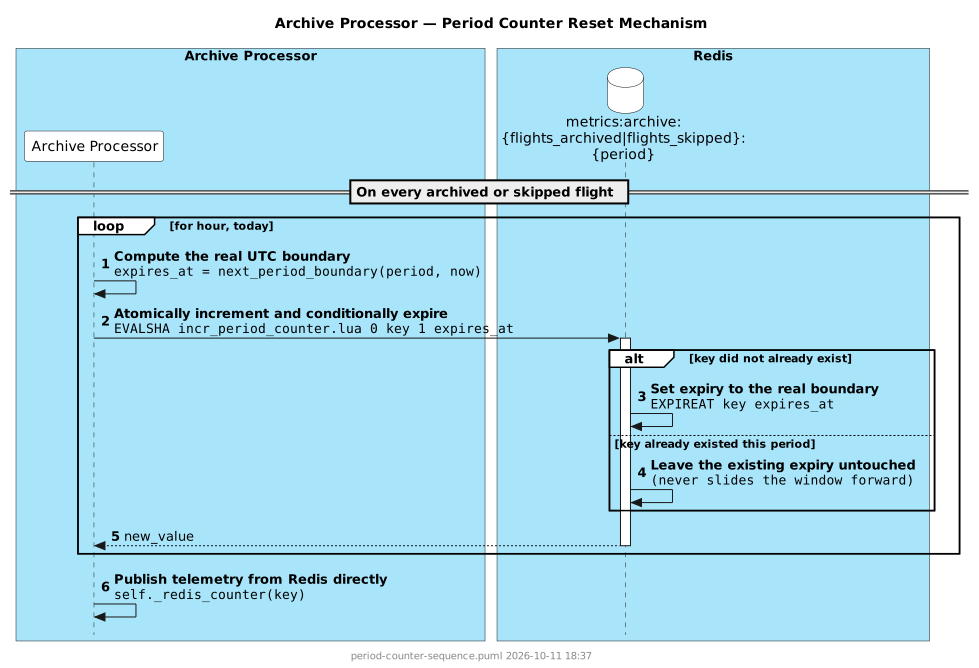
flights_archived_{hour,today}/flights_skipped_{hour,today}/fields_backfilled_{hour,today} are backed by metrics:archive:flights_archived:{hour|today}/ metrics:archive:flights_skipped:{hour|today}/ metrics:archive:fields_backfilled:{hour|today} in Redis, and genuinely reset at the real UTC hour/midnight boundary rather than accumulating forever. Both increments go through EVALSHA against shared/lua/incr_period_counter.lua (SCRIPT LOADed once at startup into self._incr_period_counter_sha, reloaded once on NoScriptError after a Redis restart), which sets EXPIREAT to the real next UTC boundary (shared/metrics.py's next_period_boundary()) only the instant a call creates the key — never on a later increment within the same period, so the window can't slide forward. Redis's own TTL expiry deletes the key at the boundary; the next completed/skipped flight after that recreates it fresh, a genuine reset with no external scheduler involved. There is no lifetime period for either counter in this Redis mechanism — out of scope for this component's existing two counters, unlike message-processor's equivalent mechanism (see message-processor/README.md), which does add one. flights_archived_lifetime/flights_skipped_lifetime above cover the same need through a different, additive mechanism instead: plain in-memory counters published directly by the archive processor, never touching Redis, deliberately not durable across a restart (mirroring the receiver's own Lifetime sensors).